
Ever wonder how Google finds your brand-new blog post within hours of hitting publish? Or why some pages seem invisible to search engines no matter what you do?
Here’s the thing: there’s an entire army of digital robots working 24/7, systematically exploring every corner of the internet. These tireless workers are called web crawlers (or search engine bots), and understanding how they work is absolutely crucial if you want your content to get discovered.
Think of web crawlers as the scouts of the search engine world. Without them, Google wouldn’t know your website exists, and your perfectly crafted content would sit in digital darkness, unseen and unranked.
In this guide, I’ll break down exactly how web crawlers operate, why they matter for your SEO strategy, and most importantly—how to make sure they’re finding (and loving) your content.
Table of Contents
ToggleWhat Exactly Are Web Crawlers?
Let’s start with the basics.
Web crawlers (also called spiders, bots, or search engine crawlers) are automated programs that systematically browse the internet, discovering and indexing web pages. Think of them as digital librarians who catalog every book (webpage) they find so people can search for them later.
The most famous crawler? Googlebot—Google’s primary web crawler that’s responsible for discovering and indexing billions of web pages. But Google isn’t alone. Bing has Bingbot, Yandex has YandexBot, and even social media platforms like Facebook have their own crawlers.
Here’s what makes crawlers fascinating: they don’t actually “see” your website the way humans do. They read the code, follow links, and gather data to understand what your page is about and whether it deserves a spot in search results.
How Do Web Crawlers Find New Pages?
This is where it gets interesting.
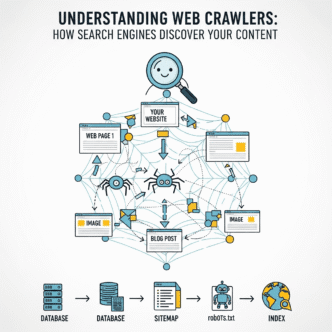
Web crawlers discover new content through three main methods:
1. Following Links (The Primary Method)
Crawlers start with known web pages and follow every link they find, jumping from page to page like you might click through Wikipedia articles at 2 AM. This is why internal linking and getting backlinks from established sites matters so much.
If your page isn’t linked from anywhere, crawlers might never find it—it’s like building a store with no roads leading to it.
2. Sitemap Submissions
You can give crawlers a roadmap by submitting an XML sitemap through Google Search Console. This tells search engines, “Hey, these are all my pages—please check them out!” It’s particularly helpful for new websites or pages buried deep in your site structure.
3. Direct URL Submissions
You can manually request indexing for specific URLs through Google Search Console. This is useful when you’ve just published something time-sensitive and want Google to know about it immediately.
Pro Tip: New websites can take days or even weeks to get crawled naturally. Speed things up by submitting your sitemap AND getting a few quality backlinks from established sites. This signals to search engine bots that your content is worth checking out.
How Googlebot Works: The Crawling Process Explained
Let’s dive into how Googlebot works specifically, since it handles the majority of web traffic.
The crawling process happens in distinct stages:
Stage 1: Discovery (Finding URLs)
Googlebot maintains a massive list of URLs to visit, built from previous crawls, sitemap submissions, and newly discovered links. It prioritizes which pages to crawl based on factors like site authority, update frequency, and importance.
Stage 2: Crawling (Visiting Pages)
When Googlebot visits your page, it downloads the HTML code and resources (like CSS and JavaScript). Modern Googlebot can even render JavaScript, which is crucial since many websites rely heavily on it.
However, rendering JavaScript takes more resources, so Google may initially crawl without rendering, then return later for a full render.
Stage 3: Processing (Understanding Content)
After downloading your page, Google analyzes the content to understand what it’s about. This includes reading text, examining images (through alt text), checking structured data, and evaluating user experience signals.
Stage 4: Indexing (Adding to the Database)
If Google deems your content valuable and technically sound, it adds the page to its index—essentially a massive database of web pages. Only indexed pages can appear in search results.
Not every crawled page gets indexed. Low-quality content, duplicate pages, or pages blocked by robots.txt won’t make the cut.
Understanding Web Crawler Behavior for SEO
Here’s what most beginners miss: understanding web crawler behavior isn’t just technical knowledge—it’s a competitive advantage.
Crawlers have limited resources (called “crawl budget”), especially for smaller websites. If your site has thousands of low-value pages, crawlers might waste time on junk instead of your best content.
Factors that influence crawler behavior:
- Site speed: Slow sites get crawled less frequently
- Internal linking structure: Well-linked pages get crawled more often
- XML sitemaps: Help prioritize important pages
- Robots.txt files: Tell crawlers which areas to avoid
- Server errors: Too many 404s or 500 errors signal problems
- Mobile-friendliness: Google prioritizes mobile-first indexing
Pro Tip: Check your crawl stats in Google Search Console regularly. Sudden drops in crawl rate often indicate technical problems that need immediate attention.
What Are Search Engine Crawlers and How Do They Work?
Different search engines use different crawlers, and what are search engine crawlers extends beyond just Google.
Major Search Engine Crawlers Comparison
| Search Engine | Crawler Name | Purpose / Specialty | Crawl Frequency | Example Use |
|---|---|---|---|---|
| Googlebot | Crawls & indexes billions of pages for Google Search | Very High | Core for global search | |
| Bing | Bingbot | Crawls for Bing & Yahoo | High | Indexing web + image content |
| Baidu | Baiduspider | Used for Chinese search market | Moderate | China-focused sites |
| Yandex | YandexBot | Used for Russian market | Moderate | Local SEO in Russia |
| DuckDuckGo | DuckDuckBot | Aggregates from multiple sources | Low | Privacy-focused search |
| Ahrefs | AhrefsBot | SEO analytics crawling | Moderate | Backlink analysis |
| Semrush | SemrushBot | Collects SEO data for tools | Moderate | Competitor insights |
| Search Engine | Crawler Name | Market Share | Unique Characteristics |
|---|---|---|---|
| Googlebot | ~92% | Most sophisticated; renders JavaScript; mobile-first indexing | |
| Bing | Bingbot | ~3% | Less aggressive crawling; prioritizes page speed |
| Yandex | YandexBot | ~1% (higher in Russia) | Strong focus on user behavior signals |
| Baidu | Baiduspider | Dominant in China | Prefers Chinese-hosted sites; different SEO rules |
| DuckDuckGo | DuckDuckBot | Growing privacy-focused audience | Pulls results from multiple sources |
While optimizing for Googlebot covers most bases, understanding how different search engine bots behave can help if you’re targeting specific markets or audiences.
For instance, if you’re targeting Russian users, understanding YandexBot’s preferences matters. Similarly, breaking into the Chinese market requires Baidu-specific optimization.
How Search Engines Work: The Bigger Picture
To truly understand web crawlers, you need to see where they fit in the broader search engine ecosystem.
The three-stage search engine process:
- Crawling: Bots discover and download web pages
- Indexing: Search engines organize and store content
- Ranking: Algorithms determine which pages appear for specific queries
Web crawlers handle that crucial first step. Without effective crawling, even the world’s best content remains invisible. This is why understanding how search engines work end-to-end helps you make smarter SEO decisions.
Common Crawling Issues (And How to Fix Them)
Let’s get practical. Here are the most common reasons web crawlers might struggle with your site:
Problem 1: Robots.txt Blocking Important Pages
Sometimes websites accidentally block crawlers from accessing important content. Check your robots.txt file (yoursite.com/robots.txt) to ensure you’re not blocking pages you want indexed.
Problem 2: Poor Internal Linking
If important pages are buried five clicks deep with no internal links pointing to them, crawlers might never find them. Create a logical site structure with strategic internal linking.
Problem 3: Slow Server Response Times
If your server takes forever to respond, crawlers move on. Use fast hosting, implement caching, and optimize your site speed. Tools like Google PageSpeed Insights can identify bottlenecks.
Problem 4: Excessive Duplicate Content
Crawlers waste time on duplicate pages instead of discovering fresh content. Use canonical tags to indicate the preferred version and consolidate similar pages.
Problem 5: JavaScript Rendering Issues
While Googlebot can render JavaScript, it’s not perfect. Critical content should be available in the initial HTML whenever possible. Test your pages with Google’s Mobile-Friendly Test to see what Googlebot renders.
Pro Tip: Use Google Search Console’s URL Inspection Tool to see exactly how Googlebot views your pages. This reveals rendering issues, indexing problems, and crawl errors you might miss otherwise.
Real-World Example: Fixing a Crawl Budget Problem
Let me share a case study that illustrates the importance of understanding web crawler behavior for SEO.
An e-commerce client came to me frustrated—they had 50,000 product pages, but Google was only indexing about 5,000. Traffic was stagnant despite adding hundreds of new products monthly.
The diagnosis: Crawl budget waste.
After analyzing their crawl stats, I discovered Googlebot was spending 60% of its time crawling filter pages (like “Products sorted by price: low to high”) and paginated archive pages—essentially low-value URLs creating millions of combinations.
The solution:
- Used robots.txt to block filter and sort parameters
- Implemented canonical tags on paginated pages
- Created a clean XML sitemap with only indexable products
- Improved internal linking from homepage to important categories
The results: Within 6 weeks, indexed pages jumped to 42,000, and organic traffic increased 67%. By helping crawlers focus on valuable content, we dramatically improved the site’s visibility.
This is the power of working with crawlers instead of against them.
How to Make Your Content Crawler-Friendly
Ready to optimize for web crawlers? Here’s your action plan:
1. Create a Logical Site Structure
Organize content hierarchically with clear categories. Important pages should be accessible within 3 clicks from your homepage. Think about how search engines work when structuring your site.
2. Build Strong Internal Links
Link related content together using descriptive anchor text. This helps crawlers understand relationships between pages and discover new content efficiently.
3. Submit an XML Sitemap
Generate a clean sitemap that includes only the pages you want indexed. Update it whenever you add significant content and resubmit through Google Search Console.
4. Optimize Your Robots.txt File
Use robots.txt strategically to prevent crawlers from wasting time on admin pages, duplicate content, or low-value URLs. But be careful—blocking the wrong things causes major problems.
Regularly monitor for 404 errors, broken links, and server issues. Crawlers interpret these as signs of a poorly maintained site.
6. Improve Page Speed
Fast sites get crawled more frequently and more thoroughly. Compress images, enable browser caching, use a CDN, and minimize CSS/JavaScript files.
7. Use Structured Data
Implement schema markup to help crawlers understand your content type (articles, products, recipes, etc.). This can lead to rich results in search listings.
8. Keep Content Fresh
Regularly updated sites get crawled more frequently. Even minor updates to important pages signal to search engine crawlers that your content stays current.
Expert Insight from John Mueller (Google Search Advocate): “One of the common misunderstandings about crawling is that adding more pages to a site will somehow make Google crawl more. In practice, we try to be efficient about crawling, so having a clear sitemap and solid internal linking is far more important than raw page count.”
Advanced Crawler Optimization Strategies
Once you’ve mastered the basics, these advanced tactics can give you an edge:
Use Crawl Delay Strategically
If you’re seeing server strain from aggressive crawling, you can request a slower crawl rate through Google Search Console. However, this should be a last resort—focus on improving server capacity instead.
Implement Log File Analysis
Review your server logs to see exactly which pages crawlers visit, how often, and which they ignore. Tools like Screaming Frog Log Analyzer reveal crawler behavior patterns you can’t see in Google Search Console.
Optimize for Mobile-First Indexing
Since Google predominantly uses the mobile version of your content for indexing, ensure your mobile site has the same content, structured data, and metadata as desktop.
Leverage Conditional Loading
For resource-heavy pages, use lazy loading for images and content below the fold. This reduces initial load time without hiding content from crawlers (since they scroll to render the full page).
Monitor International Crawling
If you have international versions of your site, use hreflang tags correctly and ensure crawlers can access all regional variants. Check Google Search Console data for each country version separately.
The Relationship Between Crawling and Ranking
Here’s a critical point: getting crawled doesn’t guarantee rankings.
Crawling is just the first step. Your page must also:
- Get indexed (added to the search database)
- Be considered relevant for specific queries
- Compete with other pages on quality signals
However, if crawlers can’t access your content properly, nothing else matters. You’re essentially competing with one hand tied behind your back.
This is why technical SEO forms the foundation of any successful strategy. Without proper crawling and indexing, even brilliant content languishes in obscurity.
Tools for Monitoring Crawler Activity
Want to see how crawlers interact with your site? These tools are essential:
Google Search Console (Free) Your primary tool for monitoring crawl stats, coverage issues, and indexing status. Check this weekly at minimum.
Bing Webmaster Tools (Free) Similar to Search Console but for Bing. Worth setting up if you’re targeting diverse search engines.
Screaming Frog SEO Spider (Freemium) Crawls your site like a search engine bot, identifying technical issues before they impact real crawlers.
Ahrefs Site Audit (Paid) Comprehensive crawler that identifies technical SEO issues affecting crawlability, along with detailed recommendations.
SEMrush Site Audit (Paid) Another excellent option for deep technical analysis and crawler accessibility testing.
Pro Tip: Set up automated weekly reports from Google Search Console monitoring your coverage status. Catching indexing drops early prevents major traffic losses.
Frequently Asked Questions
How often do web crawlers visit my website?
It varies dramatically based on your site’s authority, update frequency, and crawl budget. High-authority news sites might get crawled every few minutes, while small blogs might see crawlers weekly or monthly. Publishing fresh content regularly increases crawl frequency.
Can I force Google to crawl my page immediately?
You can’t force it, but you can request indexing through Google Search Console’s URL Inspection Tool. Google typically responds within hours to a few days, though it’s not guaranteed. High-priority pages on authoritative sites get crawled faster.
Do web crawlers read JavaScript?
Yes, Googlebot can render and read JavaScript, but it’s a two-step process that takes more time and resources. Critical content should be available in the initial HTML response whenever possible for fastest indexing.
Why isn’t my page showing up in Google even though it’s been crawled?
Crawling and indexing are different. Google might crawl your page but decide not to index it due to quality issues, duplicate content, thin content, or technical problems. Check the “Coverage” report in Google Search Console for specific reasons.
How can I see what Googlebot sees on my page?
Use the URL Inspection Tool in Google Search Console and click “View Crawled Page.” This shows you the rendered HTML exactly as Googlebot sees it, revealing any rendering or accessibility issues.
What’s the difference between crawl budget and crawl rate?
Crawl rate is how fast Googlebot requests pages from your server (requests per second). Crawl budget is the total number of pages Google will crawl on your site over a given time period. Most small to medium sites don’t need to worry about crawl budget.
Final Thoughts
Understanding web crawlers isn’t just technical trivia—it’s the foundation of getting your content discovered and ranked.
Here’s the bottom line: if search engine bots can’t easily find, crawl, and understand your content, all your other SEO efforts are built on shaky ground. Master crawlability first, then focus on creating amazing content and building authority.
The good news? Making your site crawler-friendly also tends to improve user experience. Fast loading times, clear navigation, and logical structure benefit both bots and humans.
Start by auditing your current crawl stats in Google Search Console. Identify any coverage issues, fix technical problems, and optimize your site structure. The investment pays dividends in organic visibility.
Remember: search engine crawlers are your allies, not your enemies. Make their job easier, and they’ll reward you by discovering and indexing your best content faster.
Now it’s time to put this knowledge into action. Check your crawl stats, fix any issues, and watch your organic visibility grow.
Want to dive deeper into how search engines process and rank your content after crawling? Check out my comprehensive guide on how search engines work to complete your understanding of the entire SEO ecosystem.