You’ve published a blog post. It’s well-written, valuable, and ready to change lives.
But Google? Google doesn’t care. Yet.
Because here’s the truth: on-page SEO elements are the secret handshake between your content and search engines. Without them, you’re whispering into the void. With them, you’re practically waving a neon sign that says, “Hey Google, rank me!”
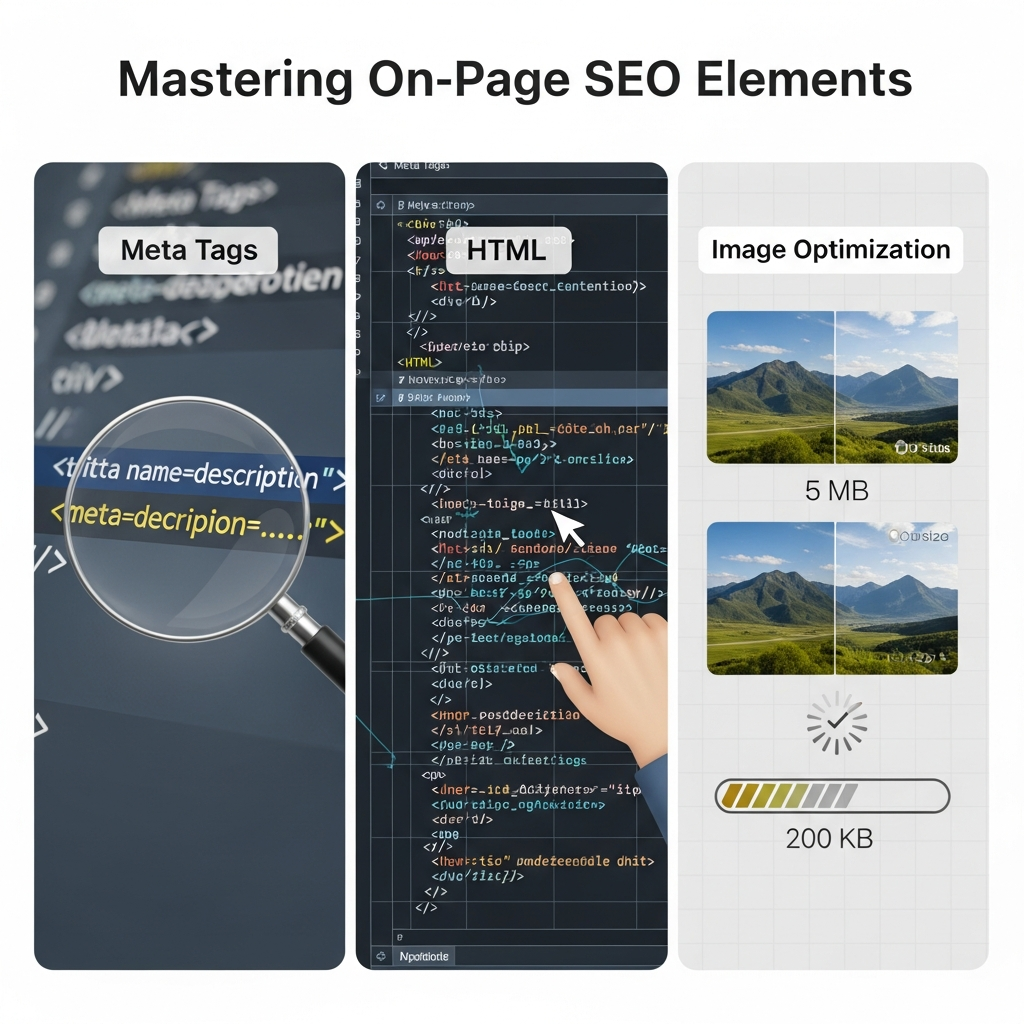
This guide breaks down the essential components of on-page SEO — meta tags, HTML structure, and image optimization — in a way that won’t make your brain hurt. No coding degree required.
Let’s dive in.
Table of Contents
ToggleWhat Are On-Page SEO Elements (And Why Should You Care)?
On-page SEO elements are the parts of your website you can control and optimize directly on each page.
Think of them as the ingredients in your SEO recipe. You’ve got meta tags SEO, HTML elements SEO, internal links, content quality, and image optimization SEO. Mix them right, and Google serves your page to hungry searchers.
According to Backlinko’s analysis of 11.8 million search results, on-page factors remain critical ranking signals in 2025. Ignoring them is like showing up to a job interview in pajamas — technically possible, but not recommended.
SEO best practices have evolved, but the fundamentals remain: make your content understandable for search engines and irresistible for humans.
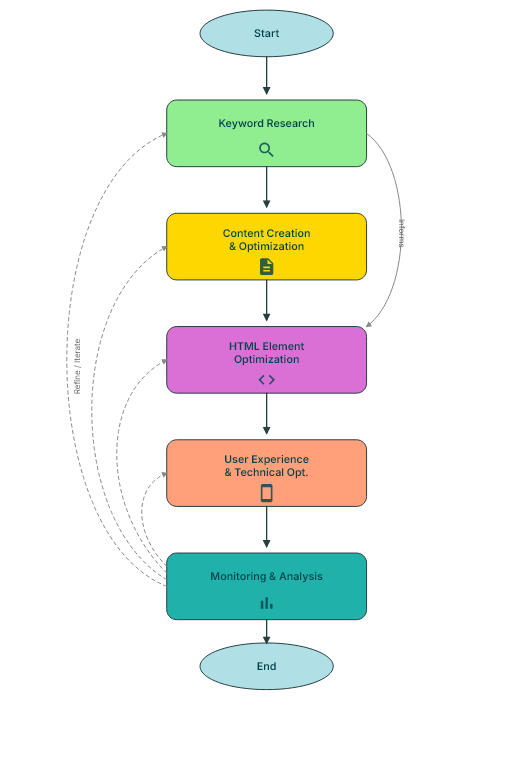
The Anatomy of On-Page SEO: A Quick Overview
Before we go deep, here’s what we’re covering:
- Meta tags (title tags, meta descriptions, Open Graph tags)
- HTML structure (headings, schema markup, canonical tags)
- Image optimization (alt text, file size, formats, responsive images)
- User experience signals (mobile-friendliness, dwell time, page speed, Core Web Vitals)
- Content optimization (keyword placement, search intent optimization, content depth)
- Technical foundations (URL structure, internal linking, crawlability)
These aren’t isolated tactics. They work together like a well-oiled machine, each gear turning the others.
Meta Tags SEO: Your First Impression in Search Results
What Are Meta Tags?
Meta tags are snippets of HTML code that tell search engines what your page is about.
You don’t see them on the page itself. But they show up in search results and browser tabs, making them your digital storefront window.
The most important meta tags for SEO include title tags, meta descriptions, robots tags, and Open Graph tags for social sharing.
Title Tags: The Heavyweight Champion
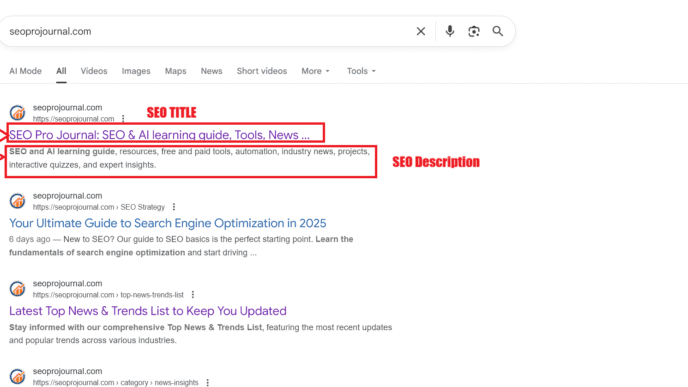
Your title tag is the clickable headline in search results.
It’s also one of the most important SEO ranking factors. Moz research shows that optimized title tags can significantly impact click-through rate (CTR), which indirectly boosts rankings.
Best practices for title tags:
- Keep it under 60 characters (Google truncates longer titles)
- Include your focus keyword near the beginning
- Make it compelling — think benefits, not just keywords
- Add brand name at the end if space allows
- Create unique titles for every page
- Use power words that trigger emotion or curiosity
Good example:
“On-Page SEO Guide: Master Meta Tags & HTML in 2025 | YourBrand
Bad example:
SEO | On-Page | Meta Tags | HTML | Images | Guide | Tips | 2025
The second example commits multiple sins: it’s stuffed with keywords, uses separators excessively, and provides no clear value proposition.
Title Tag Length: The Technical Reality
Google’s display limit hovers around 580–600 pixels, not characters.
That’s why “www” takes up less space than “MMMM” — pixel width matters. Most SEO tools estimate 60 characters as a safe limit, but your actual cutoff depends on which letters you use.
Wide characters (W, M, O) eat up pixels faster than narrow ones (i, l, t).
Test your titles with tools like Moz’s Title Tag Preview Tool or SERP Simulator to see exactly how they’ll appear.
Meta Descriptions: Your Sales Pitch
Meta descriptions don’t directly impact rankings. But they absolutely affect CTR.
Think of them as your elevator pitch to searchers. You’ve got roughly 155–160 characters to convince someone to click.
Meta description writing tips:
- Include your focus keyword (Google bolds matching terms)
- Create urgency or curiosity
- Include a call-to-action
- Stay within 155 characters to avoid truncation
- Write unique descriptions for every important page
- Address the user’s pain point or question
- Add numbers or dates when relevant (“Updated 2025”)
Example:
“Learn essential on-page SEO elements including meta tags, HTML structure, and image optimization. Boost your rankings without coding. Start now!”
Notice how this description includes the keyword, a benefit (“boost your rankings”), a qualifier (“without coding”), and a CTA (“Start now”).
When Google Ignores Your Meta Description
Here’s a frustrating truth: Google rewrites meta descriptions about 63% of the time, according to research by Ahrefs.
Why? If Google thinks it can generate a more relevant snippet from your page content, it will.
This happens when your description doesn’t match search intent, is too generic, or when the query is very specific and Google finds better matching text on your page.
Your defense: Write descriptions that genuinely summarize your content and match likely search queries.
Open Graph Tags: Social Media’s Meta Tags
Open Graph (OG) tags control how your content appears when shared on Facebook, LinkedIn, and other platforms.
They’re not technically for SEO, but they impact traffic and engagement — which indirectly helps SEO.
Essential OG tags:
og:title— The headline in social sharesog:description— The preview textog:image— The thumbnail imageog:url— The canonical URL
Twitter has its own version (Twitter Cards), but most platforms now recognize Open Graph tags.
HTML Elements SEO: Structure Matters More Than You Think
Heading Hierarchy: The Roadmap for Readers and Bots
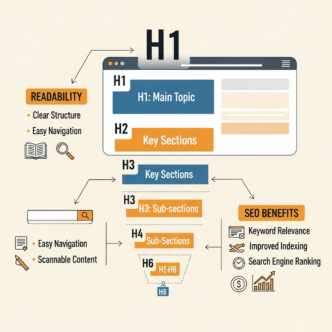
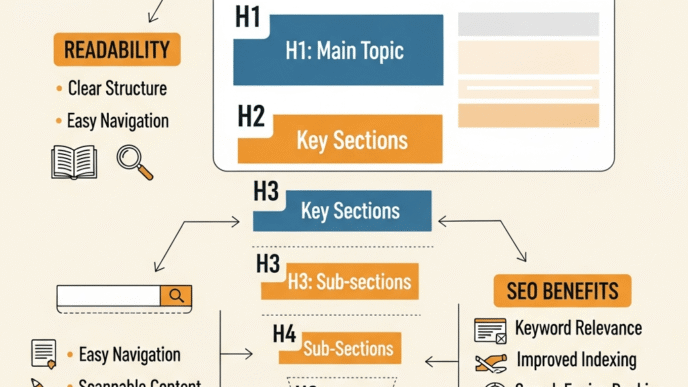
Your headings (H1, H2, H3, etc.) create a SEO page structure that guides both users and search engines.
Only one H1 per page — that’s your main headline. Then use H2s for major sections and H3s for subsections.
Think of it like a table of contents. Your H1 is the book title, H2s are chapters, and H3s are sections within chapters. This hierarchy helps search engines understand which information is most important and how topics relate to each other.
Why heading hierarchy matters:
- Improves readability and user experience signals
- Helps Google understand your content structure
- Provides keyword placement opportunities without stuffing
- Reduces bounce rate by making content scannable
- Assists screen readers for accessibility
- Creates jump links in search results for long content
Pro tip: Include your focus keyword in at least one H2, but keep it natural. Google’s smarter than you think.
The H1 Question: How Many Is Too Many?
Technically, HTML5 allows multiple H1 tags.
But from an SEO perspective, stick to one. It reinforces your page’s primary topic and eliminates confusion about what the page is actually about.
Your H1 should match or closely relate to your title tag. Consistency signals relevance to search engines.
Creating Question-Based Headings
Question-format headings (H2/H3) serve multiple purposes:
They match how people actually search (“How do I optimize images for SEO?” rather than “Image Optimization Tutorial”).
They also position your content for featured snippets. Google loves pulling answers from content with clear question-and-answer structures.
Examples of effective question headings:
- “What Is the Ideal Title Tag Length for SEO?”
- How Does Alt Text Impact Image Rankings?”
- “Why Do Meta Descriptions Matter If They Don’t Affect Rankings?”
Each question creates a mini-pillar within your pillar post.
URL Structure: Keep It Clean and Keyword-Rich
URLs are like street addresses. The cleaner they are, the easier they are to find.
Good URL:yoursite.com/on-page-seo-elements-guide
Bad URL:yoursite.com/p?=12345&cat=blog&ref=xyz
Descriptive, keyword-rich URLs perform better. According to Search Engine Journal, short URLs tend to rank higher than long, complex ones.
URL best practices:
- Use hyphens, not underscores (Google treats hyphens as space)
- Keep it under 60 characters when possible
- Include your target keyword
- Avoid stop words (a, an, the, of) unless necessary
- Use lowercase letters only
- Don’t change URLs without proper 301 redirects
Your URL should give users and search engines a clear idea of what’s on the page before they even click.
Canonical Tags: Solving the Duplicate Content Problem
Canonical tags tell search engines which version of a page is the “master” when you have similar or duplicate content.
Say you have a product available in three colors, each with its own URL. You don’t want those pages competing against each other. A canonical tag points all versions to one preferred URL.
The tag looks like this in your HTML:<link rel="canonical" href="https://yoursite.com/preferred-url" />
Common scenarios needing canonical tags:
- Product variations (size, color)
- Print versions of pages
- Session IDs in URLs
- Paginated content
- HTTP vs HTTPS versions
Without canonical tags, you risk splitting your SEO ranking factors across multiple URLs instead of consolidating authority in one place.
Schema Markup: Speaking Google’s Language
Schema markup is structured data that helps search engines understand your content context.
It won’t make you rank overnight. But it can earn you rich snippets — those enhanced search results with star ratings, FAQs, or how-to steps.
Semrush research shows pages with schema markup rank an average of four positions higher than those without.
Common schema types:
- Article schema — For blog posts and news articles
- FAQ schema — For question-and-answer content
- How-to schema — For instructional content with steps
- Product schema — For ecommerce items with ratings and prices
- LocalBusiness schema — For businesses with physical locations
- Review schema — For product or service reviews
You don’t need to code it manually. Tools like Google’s Schema Markup Helper and plugins like Rank Math or Yoast make implementation easy.
Breadcrumb Navigation: Not Just for Hansel and Gretel
Breadcrumbs show the path from homepage to current page:
Home > Blog > SEO > On-Page SEO Elements
They improve user navigation and create internal link structures that search engines love.
Bonus: When implemented with breadcrumb schema, they appear in search results, making your listing more prominent and professional.
Image Optimization SEO: Because Visuals Matter Too
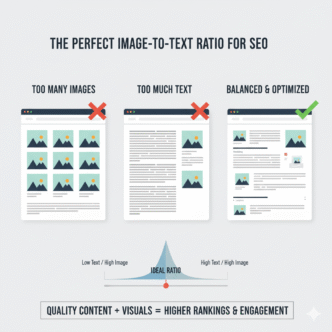
Images make content engaging. But unoptimized images? They’re ranking killers.
Why Image Optimization Matters
According to HTTP Archive data, images account for about 50% of the average webpage’s total weight. Heavy images = slow pages = frustrated users = lower rankings.
Plus, visual content SEO helps you appear in Google Image Search — a massively underutilized traffic source. In some niches, image search drives 20–30% of total organic traffic.
Visual content also increases engagement. Articles with images every 100 words get double the social shares compared to articles with fewer images, according to content marketing studies.
Alt Text Optimization: Describe What You See
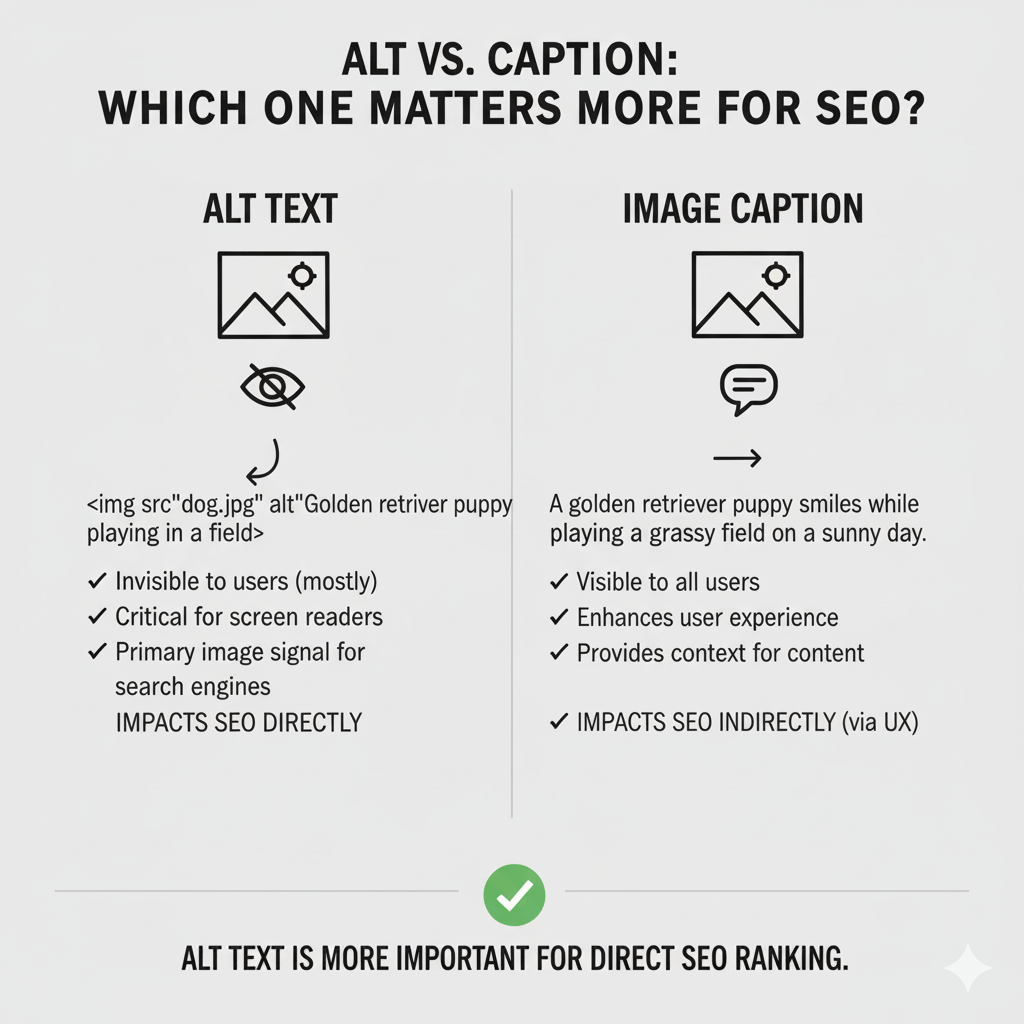
Alt text (alternative text) serves two purposes:
- Accessibility — screen readers use it for visually impaired users
- SEO — Google uses it to understand image content
Alt text best practices:
- Be descriptive but concise (125 characters or less)
- Include relevant keywords naturally (not stuffed)
- Don’t start with “image of” or “picture of”
- Leave decorative images with empty alt tags (alt=””)
- Describe the content and function of the image
- Be specific (not “dog” but “golden retriever puppy playing in park”)
Good alt text:
“Digital marketer analyzing on-page SEO elements dashboard on laptop
Bad alt text:
“Image123.jpg” or “SEO, on-page, optimization, keywords, ranking, Google, meta tags”
The first describes what’s actually in the image. The second is keyword stuffing that helps nobody.
When to Skip Alt Text
Decorative images that add no information value should have empty alt attributes (alt=””), not missing alt attributes.
This tells screen readers to skip the image entirely. Examples include decorative borders, spacers, or purely aesthetic elements.
If an image is already fully described in surrounding text, a short alt tag is fine.
File Size and Format: Speed Wins
Large image files slow down your site. Period.
Optimize images by:
- Compressing files (use tools like TinyPNG or ShortPixel)
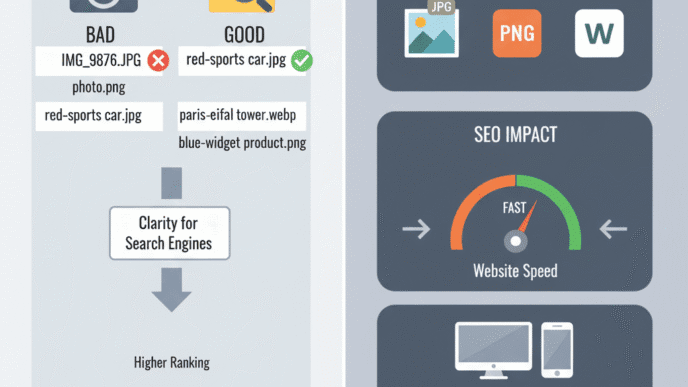
- Choosing the right format (WebP for most cases, JPEG for photos, PNG for graphics with transparency)
- Implementing lazy loading (images load as users scroll)
- Using responsive images (different sizes for different devices)
- Setting explicit width and height attributes
A Google study found that as page load time goes from 1s to 3s, bounce rate increases by 32%. At 5s? It jumps 90%.
Your images better be worth that wait. Spoiler: they’re not.
Image Format Comparison
JPEG:
- Best for photographs with lots of colors
- Lossy compression (smaller files, some quality loss)
- No transparency support
PNG:
- Best for graphics, logos, images needing transparency
- Lossless compression (larger files, perfect quality)
- Supports transparency
WebP:
- Modern format with superior compression
- 25–35% smaller than JPEG/PNG with comparable quality
- Supports both lossy and lossless compression
- Supported by all modern browsers (95%+ as of 2025)
AVIF:
- Newest format with even better compression than WebP
- Growing browser support
- Best for future-proofing
Recommendation: Use WebP as your default with JPEG/PNG fallbacks for older browsers.
Image File Names: Don’t Ignore This Low-Hanging Fruit
Before uploading an image, rename it.
IMG_0042.jpg tells Google nothing. on-page-seo-checklist-infographic.jpg tells Google everything.
Use hyphens (not underscores), include keywords, and keep it descriptive. This is one of the easiest wins in image optimization SEO.
Responsive Images and Mobile Optimization
Serving a 2000px wide image to a mobile device is wasteful and slow.
Use the srcset attribute to serve different image sizes based on device:
<img src="image-800.jpg"
     srcset="image-400.jpg 400w,
             image-800.jpg 800w,
             image-1200.jpg 1200w"
     alt="Description here">
This ensures mobile users get smaller, faster-loading images while desktop users get full resolution.
Lazy Loading: Load Images Only When Needed
Lazy loading defers loading off-screen images until users scroll near them.
This dramatically improves initial page load time. In fact, lazy loading is now supported natively in modern browsers with a simple attribute:
<img src="image.jpg" loading="lazy" alt="Description">
For older browsers, JavaScript libraries like lazysizes provide backward compatibility.
Image Sitemaps: Help Google Find Your Images
Submit an image sitemap to Google Search Console to ensure all your images are discovered and indexed.
This is especially important for:
- JavaScript-heavy sites where images load dynamically
- Ecommerce sites with thousands of product images
- Sites where images are key content (photography, art, design portfolios)
Your image sitemap should include the image URL, caption, title, and geo-location if relevant.
On-Page Optimization Techniques: Beyond the Basics
Internal Linking: Building Your SEO Web
Internal links connect your pages, spread link equity, and help Google discover content.
They’re also one of the most powerful ranking signals you control completely. While you can’t force others to link to you, you can strategically link within your own site.
Best practices:
- Link to relevant, related content naturally within your text
- Use descriptive anchor text (not “click here” or “read more”)
- Aim for 2–5 internal links per post
- Don’t orphan pages — every page should be reachable within 3 clicks
- Link deep (don’t just link to homepage)
- Update old content with links to new related posts
Internal linking is one of the most underrated on-page optimization techniques. Ahrefs found that internal links can significantly impact how well pages rank.
Internal Link Architecture Strategies
Hub and Spoke Model:
Your pillar post (hub) links to related subtopic posts (spokes), and those spokes link back to the hub. This creates a tight topical cluster that signals expertise.
Contextual Linking:
Links embedded naturally in sentences perform better than those in sidebars or footers. They pass more authority and are more likely to be clicked.
Strategic Anchor Text:
Use exact-match keywords occasionally, but favor natural descriptive phrases. Our complete guide to meta tags” is better than just “meta tags.
Mobile-Friendly SEO: Non-Negotiable in 2025
Google uses mobile-first indexing. That means it primarily uses the mobile version of your site for ranking.
If your site isn’t mobile-friendly SEO optimized, you’re playing with fire. According to Statista, mobile devices generated 59.16% of global website traffic in 2024.
Mobile optimization checklist:
- Responsive design that adapts to screen size
- Readable font sizes (at least 16px for body text)
- Touch-friendly buttons (minimum 48×48 pixels)
- Fast mobile page speed (aim for under 3 seconds)
- No intrusive interstitials (pop-ups covering content)
- Sufficient contrast for outdoor viewing
- Simplified navigation (hamburger menus, clear CTAs)
Test your site with Google’s Mobile-Friendly Test tool.
Mobile-Specific Issues to Avoid
Unplayable content:
Flash and other obsolete technologies don’t work on mobile. Use HTML5 video instead.
Small text:
If users have to pinch-zoom to read, you’ve failed. Font size should be minimum 16px.
Tap targets too close:
Fingers are fatter than mouse cursors. Space interactive elements at least 8px apart.
Horizontal scrolling:
Content should never require horizontal scrolling. It’s a user experience nightmare.
Page Speed: The Silent Ranking Factor
Speed is a confirmed ranking factor. But more importantly, it’s a user experience factor.
Think With Google research shows 53% of mobile users abandon sites that take over 3 seconds to load.
Every second counts. Amazon found that every 100ms delay costs them 1% in sales. That’s real money on the table.
Quick wins for faster pages:
- Enable browser caching (store static files locally)
- Minify CSS, JavaScript, and HTML (remove unnecessary characters)
- Use a Content Delivery Network (CDN) to serve files from servers closest to users
- Optimize images (already covered above)
- Reduce server response time (upgrade hosting if needed)
- Eliminate render-blocking resources
- Implement critical CSS (inline essential styles)
- Defer non-critical JavaScript
Tools like Google PageSpeed Insights, GTmetrix, or WebPageTest will tell you exactly what’s slowing you down.
Core Web Vitals: Google’s User Experience Metrics
Core Web Vitals are three specific metrics Google uses to measure user experience:
Largest Contentful Paint (LCP):
How long it takes for the main content to load. Goal: under 2.5 seconds.
First Input Delay (FID) / Interaction to Next Paint (INP):
How quickly the page responds to user interactions. Goal: under 100ms (FID) or 200ms (INP).
Cumulative Layout Shift (CLS):
How much the layout shifts as content loads. Goal: under 0.1.
These metrics matter because they directly impact whether users stay or bounce. Poor Core Web Vitals = poor rankings.
Check yours in Google Search Console under the “Core Web Vitals” report.
Content Is Still King: Writing for Humans and Bots
Keyword Placement Without Keyword Stuffing
Your focus keyword should appear naturally in:
- The first 100 words (preferably first paragraph)
- At least one H2 or H3 heading
- Throughout the body (aim for 1–2% keyword density)
- URL, title tag, and meta description
- Image file names and alt text
- Conclusion section
But don’t force it. Google’s BERT and MUM updates mean the algorithm understands context and semantics. Synonyms and related terms matter more than exact-match repetition.
Modern search intent optimization focuses on topical coverage, not keyword density.
The LSI Keyword Myth
Let’s bust a common myth: “LSI keywords” don’t exist in the way most SEO blogs describe them.
Latent Semantic Indexing is a real technology, but Google doesn’t use it. What people call “LSI keywords” are really just related terms and synonyms.
Instead of obsessing over “LSI keywords,” focus on comprehensive topical coverage. If you’re writing about on-page SEO, naturally you’ll mention ranking factors, meta tags, user experience, and related concepts.
Write naturally about your topic. The related terms will appear organically.
Search Intent Optimization: Give People What They Want
Matching search intent is crucial. It’s the difference between ranking and being ignored.
There are four main types:
- Informational — “what is on-page SEO” (people want to learn)
- Navigational — “Moz keyword explorer” (people want a specific site)
- Commercial — “best SEO tools 2025″ (people comparing options before buying)
- Transactional — “buy SEO software” (people ready to purchase)
Your content should match the intent behind the keyword. A how-to guide won’t rank for a product search. A product page won’t rank for an informational query.
Study the top 10 results for your target keyword. What format are they using? What questions are they answering? That’s your blueprint.
The SERP Analysis Method
Before writing, analyze the Search Engine Results Page (SERP):
What format dominates?
Lists, guides, comparisons, videos? Match the format users expect.
How long is the content?
If top results are 3,000+ words, a 500-word post won’t cut it.
What subtopics are covered?
Create a “content outline” by extracting H2s from the top 10 results. Cover all major subtopics.
What’s missing?
Find gaps in existing content. That’s your opportunity to provide unique value.
Tools like Surfer SEO and Clearscope automate much of this analysis.
Content Length: Quality Over Quantity (But Length Still Matters)
HubSpot data shows that long-form content (2,000+ words) tends to rank higher and earn more backlinks.
But length alone won’t save bad content. Focus on depth, usefulness, and readability first. Word count second.
If you can fully answer a query in 800 words, don’t fluff it to 2,000. Google rewards thoroughness, not verbosity.
That said, complex topics naturally require more words. This pillar post on on-page SEO elements needs 3,000+ words because the topic has depth. A post on “how to change a tire” might need only 1,000.
Match length to topic complexity and user intent.
Content Freshness: Keep It Updated
Google favors fresh content for queries where recency matters.
Semrush research shows that 47% of top-ranking pages see their traffic decay over time as they become outdated.
Update your content regularly:
- Add new statistics and examples
- Refresh outdated information
- Expand thin sections
- Update dates in titles and content
- Add new internal links
Then change your publish date and resubmit to Google via Search Console. This signals freshness.
Readability: Write for Humans First
Even perfect technical optimization fails if your content is unreadable.
Readability tips:
- Use short paragraphs (2–3 sentences max)
- Vary sentence length for rhythm
- Use transition words to guide readers
- Break up text with headings, lists, and images
- Write in active voice
- Avoid jargon unless your audience expects it
- Use tools like Hemingway Editor to check readability scores
Aim for a 7th–9th grade reading level for general audiences. B2B or technical audiences can handle higher complexity, but clarity always wins.
Content Depth vs Breadth
For pillar posts, err on the side of depth.
Don’t just scratch the surface of meta tags — explain why they matter, show examples, cover common mistakes, and link to tools. That’s depth.
Breadth means covering many related subtopics. This post covers meta tags, HTML, images, speed, mobile, content, and more. That’s breadth.
Pillar posts need both. Go deep on each major subtopic while maintaining comprehensive coverage of the main topic.
Common On-Page SEO Mistakes (And How to Avoid Them)
1. Ignoring Title Tag Length
Google truncates titles around 60 characters. Anything beyond that gets cut off with “…”
Your most important words should be frontloaded. Save the brand name for the end where it can be cut without losing meaning.
Test every title before publishing.
2. Duplicate Meta Descriptions
Every page should have a unique meta description.
Copy-pasting the same description across multiple pages confuses search engines and wastes an opportunity to tailor your pitch for each specific page.
If you have hundreds of pages, prioritize unique descriptions for your most important pages first.
3. Keyword Stuffing in Alt Text
Yes, include keywords in alt text. No, don’t cram five keywords into one alt attribute.
“SEO meta tags HTML on-page optimization keywords” is stuffing.
“Screenshot of meta tag implementation in HTML editor” is natural and descriptive.
Write for humans first. If it sounds robotic, rewrite it.
4. Broken Internal Links
Links to 404 pages hurt user experience and waste link equity.
They also signal poor site maintenance to search engines. A few broken links won’t tank your site, but hundreds might.
Run regular site audits with tools like Screaming Frog, Ahrefs Site Audit, or Semrush Site Audit to catch broken links before they pile up.
5. Neglecting Core Web Vitals
Google’s Core Web Vitals measure real-world user experience signals: loading performance, interactivity, and visual stability.
Poor scores can tank your rankings, especially in competitive niches where all else is equal.
Check yours in Google Search Console. Fix the low-hanging fruit first: image optimization, caching, and render-blocking resources.
6. Missing H1 Tags
Every page needs an H1. It’s the title that tells search engines and users what the page is about.
Some themes hide H1s visually but include them in the code. That’s fine. But if your H1 is missing entirely, you’re leaving points on the table.
7. Thin Content
“Thin content” means pages with little valuable information.
300 words of fluff won’t rank. Neither will 3,000 words of keyword-stuffed nonsense.
Google’s algorithms are trained on billions of pages. They know what comprehensive, useful content looks like. Your job is to match or exceed that quality bar.
8. Ignoring Mobile Users
Designing for desktop and hoping it works on mobile is backwards.
Mobile-first design means building for small screens first, then scaling up. This ensures the mobile experience isn’t an afterthought.
Test on real devices, not just desktop browser emulators. The experience can differ significantly.
9. Forgetting About Accessibility
Accessibility and SEO overlap significantly. Alt text helps both screen readers and search engines. Clear heading hierarchy guides both humans and bots.
Making your site accessible isn’t just good ethics — it’s good SEO.
Check your site with tools like WAVE or Lighthouse for accessibility issues.
10. Over-Optimizing
Yes, you can over-optimize.
If every sentence contains your keyword, if every link has exact-match anchor text, if your alt text reads like a keyword list — you’ve gone too far.
Google’s algorithms detect unnatural patterns. Over-optimization triggers spam filters and can result in penalties.
The fix: Write naturally, optimize strategically, and prioritize user experience over search engines.
On-Page SEO Tools Comparison
| Tool | Best For | Price | Key Feature | Learning Curve |
|---|---|---|---|---|
| Yoast SEO | WordPress users | Free / $99/yr | Real-time content analysis | Beginner-friendly |
| Rank Math | WordPress power users | Free / $59/yr | Advanced schema options | Moderate |
| Surfer SEO | Content optimization | From $69/mo | SERP-based keyword suggestions | Moderate |
| Clearscope | Content briefs | From $170/mo | Competitor content analysis | Easy |
| Screaming Frog | Technical audits | Free / $259/yr | Crawls entire site for issues | Advanced |
| SEMrush | All-in-one SEO | From $129.95/mo | On-page SEO checker + more | Moderate |
| Ahrefs | Backlinks & content | From $129/mo | Content gap analysis | Moderate |
| PageSpeed Insights | Speed testing | Free | Core Web Vitals data | Easy |
Each tool has strengths. For beginners, start with Yoast or Rank Math (if on WordPress) or Google Search Console (free and powerful).
Intermediate users benefit from Surfer or Clearscope for content optimization. Advanced users need the full power of Semrush or Ahrefs for comprehensive SEO management.
Advanced On-Page SEO Tactics
Topic Clusters and Pillar Pages
Topic clusters organize your content around pillar pages (like this one) that cover broad topics, with cluster content covering specific subtopics in detail.
Structure:
- Pillar page: “On-Page SEO Elements” (broad overview)
- Cluster content: “Title Tag Optimization,” “Image Alt Text Guide,” “Schema Markup Tutorial
Each cluster page links back to the pillar. The pillar links to all clusters. This creates topical authority and clear site structure.
HubSpot’s research shows topic clusters can improve organic traffic by 30% or more compared to isolated blog posts.
Content Silos
Content silos group related content into categories with strict internal linking rules.
Pages within a silo link to each other. Links between silos are minimal. This concentrates authority within topical areas.
Example silo structure:
- SEO silo (all SEO articles link together)
- Content Marketing silo (separate cluster)
- Social Media silo (separate cluster)
The homepage links to all silos, but the silos remain mostly independent. This prevents topic dilution.
Semantic SEO and Entity Optimization
Modern SEO isn’t just about keywords. It’s about entities — people, places, things, concepts that Google understands as distinct objects.
Optimize for entities by:
- Using official names consistently
- Linking to authoritative sources that define entities
- Including relevant entity relationships (if discussing Gary Vaynerchuk, mention VaynerMedia)
- Using structured data to explicitly define entities
Google’s Knowledge Graph connects entities. Help it understand your content’s entities to improve contextual relevance.
Answer Box Optimization
Featured snippets (answer boxes) appear above traditional results. They’re SEO gold.
To win featured snippets:
- Use question-format headings
- Provide concise answers (40–60 words) immediately after the question
- Use lists, tables, or steps when appropriate
- Include the target keyword in the question and answer
- Mark up content with FAQ or How-to schema
According to Ahrefs data, featured snippets receive an estimated 8.6% of clicks, even though they’re not technically the #1 result.
User Engagement Metrics
Google measures how users interact with your content:
Dwell time:
How long users stay on your page after clicking from search. Longer is better.
Pogo-sticking:
When users click, immediately return to search, and click a different result. This signals your content didn’t satisfy their query.
Click-through rate:
Percentage of impressions that result in clicks. Higher CTR signals relevance.
These user experience signals increasingly influence rankings. Great content that keeps users engaged will outperform technically perfect but boring content.
E-E-A-T: The Quality Framework
Google’s Search Quality Rater Guidelines emphasize E-E-A-T: Experience, Expertise, Authoritativeness, and Trustworthiness.
Experience:
Demonstrate first-hand knowledge. Share real examples, case studies, and personal insights that prove you’ve actually done what you’re teaching.
Expertise:
Showcase credentials, qualifications, and deep knowledge. Link to credible sources. Use industry-specific terminology correctly.
Authoritativeness:
Build reputation through backlinks, brand mentions, and recognition in your field. Guest posts, interviews, and citations boost authority.
Trustworthiness:
Provide accurate information, cite sources, include author bios, display contact information, and use HTTPS. For YMYL (Your Money Your Life) topics like health and finance, trustworthiness is critical.
While E-E-A-T isn’t a direct ranking factor, it guides how Google’s algorithms evaluate content quality.
Author Bios and Bylines
Adding comprehensive author bios helps establish E-E-A-T signals.
Effective author bios include:
- Full name and photo
- Relevant credentials and experience
- Links to social profiles (LinkedIn, Twitter)
- Brief background on expertise
- Links to other published work
For multi-author sites, implement Article schema with author markup. This connects content to specific creators, helping Google assess expertise.
The Role of AI in On-Page SEO (2025 Trend)
AI tools like ChatGPT, Jasper, Claude, and Surfer SEO are changing how we optimize content.
But here’s the catch: Google’s algorithms are also AI-powered. They can detect thin, AI-generated content that lacks depth or originality.
A study by Originality.ai found that 85% of AI-generated content can be detected by advanced AI detection tools. Google likely has similar or better capabilities.
How to use AI responsibly:
- Use it for research and outlines, not final drafts
- Add personal insights and real-world examples
- Edit heavily — AI often produces generic fluff
- Focus on E-E-A-T signals (author bios, citations, original data)
- Verify all facts and statistics AI provides
- Never publish AI content without substantial human editing
AI is a tool, not a replacement for human expertise. The best approach combines AI efficiency with human creativity and experience.
AI-Generated Content and Google’s Position
Google’s stance is clear: they don’t penalize AI content specifically. They penalize low-quality content regardless of how it’s created.
From Google’s helpful content guidelines: “Our focus is on the quality of content, rather than how content is produced.”
Translation: AI content is fine if it’s genuinely helpful. AI content that’s thin, inaccurate, or clearly produced at scale for SEO manipulation will be penalized.
Focus on quality and usefulness. The creation method matters less than the end result.
Technical SEO Foundations That Support On-Page Optimization
XML Sitemaps: Your Site’s Table of Contents
XML sitemaps list all important pages on your site, helping search engines discover and crawl content efficiently.
Sitemap best practices:
- Submit to Google Search Console and Bing Webmaster Tools
- Update automatically when new content is published
- Include only indexable pages (no 404s, redirects, or noindex pages)
- Organize large sites into multiple sitemaps by section
- Include priority and update frequency hints
Most CMS platforms and SEO plugins generate sitemaps automatically. Just ensure they’re submitted and error-free.
Robots.txt: Directing Search Engine Crawlers
The robots.txt file tells search engines which parts of your site to crawl and which to ignore.
Common uses:
- Block admin pages and login areas
- Prevent crawling of duplicate content
- Conserve crawl budget on large sites
- Block problematic bots
Critical warning: Robots.txt blocks crawling but doesn’t prevent indexing. Use noindex meta tags for pages you want kept out of search results.
Test your robots.txt file with Google’s robots.txt Tester before deploying.
HTTPS: Security as a Ranking Factor
Google confirmed HTTPS as a ranking signal back in 2014. By 2025, it’s essentially mandatory.
HTTPS encrypts data between user and server, protecting privacy and preventing tampering. Sites without it display “Not Secure” warnings in browsers — instant credibility killers.
Migration checklist:
- Install SSL certificate (free via Let’s Encrypt)
- Update all internal links to HTTPS
- Implement 301 redirects from HTTP to HTTPS
- Update external links where possible
- Update sitemap and submit to Search Console
- Update canonical tags to HTTPS versions
Most hosting providers offer one-click SSL installation. There’s no excuse for remaining on HTTP in 2025.
Structured Data Testing
After implementing schema markup, always validate it.
Use Google’s Rich Results Test to check if your markup is eligible for enhanced search results.
Common errors:
- Missing required properties
- Invalid date formats
- Incorrect nesting of schema types
- Conflicting schema on the same page
Fix errors before they prevent rich snippets from appearing.
Local SEO and On-Page Optimization
NAP Consistency
For businesses with physical locations, NAP (Name, Address, Phone) consistency is crucial.
Your business information must match exactly across:
- Your website
- Google Business Profile
- Bing Places
- Social media profiles
- Directory listings
Even minor variations (St. vs Street, Suite vs Ste) can confuse search engines and hurt local rankings.
Local Schema Markup
LocalBusiness schema helps Google understand your location, hours, services, and contact info.
Essential properties:
- Name
- Address (with postal code)
- Phone number
- Opening hours
- Service area
- Price range
- Accepted payment methods
Local schema combined with NAP consistency significantly improves local search visibility.
Embedding Google Maps
Embedding a Google Map on your contact or location pages provides additional location signals and improves user experience.
It also encourages users to interact with your Google Business Profile, which can boost local rankings indirectly.
Monitoring and Measuring On-Page SEO Success
Key Performance Indicators (KPIs)
Track these metrics to measure on-page SEO effectiveness:
Organic traffic:
The ultimate measure. Are you getting more visitors from search?
Rankings:
Track positions for target keywords. Tools like Ahrefs, Semrush, or Moz provide rank tracking.
Click-through rate (CTR):
Available in Google Search Console. Higher CTR means better titles and descriptions.
Bounce rate & Dwell time:
Found in Google Analytics. Lower bounce rate and longer dwell time indicate engaging content.
Pages per session:
Measures how effectively your internal links encourage exploration.
Conversions:
Traffic means nothing without conversions. Track form submissions, purchases, sign-ups, etc.
Google Search Console: Your Best Friend
Google Search Console (GSC) is free and indispensable.
Key features:
- Performance reports (impressions, clicks, CTR, position)
- Coverage reports (indexing issues)
- Core Web Vitals data
- Mobile usability issues
- Manual action notifications
- URL inspection tool
Check GSC weekly at minimum. It’s your direct line to understanding how Google sees your site.
Setting Up Conversion Tracking
On-page SEO should drive business results, not just traffic.
Set up goals in Google Analytics 4:
- Form submissions
- Email sign-ups
- Downloads
- Purchases
- Phone calls (via call tracking)
Track which pages and keywords drive conversions, not just traffic. A keyword bringing 1,000 visitors but zero conversions is less valuable than one bringing 100 visitors and 10 conversions.
Regular Content Audits
Audit your content quarterly:
Identify:
- Top performers to expand and update
- Underperformers to improve or consolidate
- Outdated content to refresh or remove
- Keyword cannibalization (multiple pages competing for the same keyword)
- Missing internal links
Tools like Screaming Frog can export all pages with word counts, titles, descriptions, and headings for easy analysis.
On-Page SEO Checklist: The Complete Pre-Publish Routine
Use this checklist before publishing any content:
Meta Tags:
- [ ] Unique, keyword-rich title under 60 characters
- [ ] Compelling meta description under 155 characters
- [ ] Title and description match search intent
Content:
- [ ] Focus keyword in first paragraph
- [ ] Natural keyword placement throughout (1–2% density)
- [ ] Comprehensive coverage of topic
- [ ] 2–3 sentence paragraphs
- [ ] Mix of text, lists, images, and media
- [ ] External links to authoritative sources
- [ ] 3–6 internal links to relevant content
HTML Structure:
- [ ] One H1 tag with focus keyword
- [ ] Logical heading hierarchy (H2 → H3 → H4)
- [ ] Clean, descriptive URL
- [ ] Canonical tag set correctly
- [ ] Schema markup implemented where appropriate
Images:
- [ ] All images compressed and optimized
- [ ] Descriptive file names
- [ ] Alt text on all meaningful images
- [ ] Lazy loading enabled
- [ ] Responsive images for mobile
Technical:
- [ ] Mobile-friendly design
- [ ] Page loads in under 3 seconds
- [ ] No broken internal or external links
- [ ] HTTPS enabled
- [ ] Core Web Vitals passing
User Experience:
- [ ] Readable font sizes (16px minimum)
- [ ] Sufficient color contrast
- [ ] Touch-friendly buttons on mobile
- [ ] Clear calls-to-action
- [ ] Easy navigation
Real-World Case Study: On-Page Optimization in Action
Let’s look at a real example of on-page SEO improvement.
The Situation:
A SaaS company’s blog post about “project management tips” was stuck on page 3 of Google results despite decent backlinks.
The Problem:
Analysis revealed multiple on-page issues:
- Generic title: “Project Management Tips for Teams”
- No meta description (Google was generating one from random text)
- H1 didn’t match title tag
- Only one image, no alt text
- No internal links
- 800 words (top results averaged 2,500+ words)
- Mobile speed score: 42/100
The Fix:
- Title rewrite: “17 Project Management Tips to Boost Team Productivity in 2025”
- Meta description added: “Discover 17 proven project management tips from industry experts. Boost team productivity and deliver projects on time. Start implementing today!”
- Content expansion: 800 → 2,400 words with sections on tools, methodologies, and common challenges
- Images added: 6 custom graphics with descriptive alt text
- Internal links: 4 links to related posts on productivity and team management
- Mobile optimization: Compressed images, enabled caching, minified CSS (score improved to 89/100)
- Schema markup: Article schema with author and publish date
The Results (90 days later):
- Ranking: Page 3 → Position 4
- Organic traffic: +340%
- Time on page: 1:12 → 3:45
- Bounce rate: 68% → 41%
- Conversions (free trial sign-ups): +220%
The lesson? Comprehensive on-page optimization compounds. No single change created these results — it was the combination of all improvements working together.
Industry-Specific On-Page SEO Considerations
E-commerce Sites
Product pages need:
- Unique descriptions (never copy manufacturer descriptions)
- Multiple high-quality product images
- Product schema markup with price, availability, reviews
- Clear size/color options
- Customer review sections
- Related product links
Category pages should have:
- Unique intro text (not just product listings)
- Filter options (with crawlable URLs)
- Pagination handled properly (rel=”next” and rel=”prev” or view-all option)
Local Businesses
Location pages require:
- Unique content for each location (not duplicated)
- Embedded Google Maps
- LocalBusiness schema
- Customer testimonials
- Location-specific photos
- Clear directions and parking information
Blogs and Publishers
Article pages benefit from:
- Author schema and detailed bylines
- Article schema with headline, images, publish date
- Related articles section
- Social sharing buttons
- Comments section (moderated for quality)
- Newsletter sign-up forms
Frequently Asked Questions (FAQ)
What are the most important on-page SEO elements?
The most critical on-page SEO elements are title tags, meta descriptions, heading structure (H1, H2, H3), keyword optimization, internal linking, mobile-friendliness, page speed, and high-quality content that matches search intent. Each plays a role in how search engines understand and rank your content, but they work best when optimized together as a cohesive system.
How do meta tags affect SEO rankings?
Meta tags like title tags directly impact rankings by signaling page relevance to search engines through keyword usage and topical alignment. Meta descriptions don’t directly affect rankings but influence click-through rate, which indirectly impacts performance. Both should be optimized with relevant keywords, compelling copy, and proper length limits to maximize visibility and clicks in search results.
What’s the difference between on-page and off-page SEO?
On-page SEO refers to optimizations you make directly on your website including content quality, HTML structure, meta tags, images, internal links, and technical elements. Off-page SEO involves external factors like backlinks, social signals, brand mentions, and domain authority. Both are essential for rankings, but on-page is fully within your control while off-page depends on others’ actions.
How many keywords should I use on a page?
Focus on one primary keyword and 3–5 related secondary or LSI keywords per page. Avoid keyword stuffing by aiming for natural placement and a keyword density of 1–2%. Modern SEO prioritizes semantic relevance and comprehensive topic coverage over exact-match keyword repetition, so include related terms and synonyms naturally throughout your content.
Does image optimization really impact SEO?
Absolutely. Optimized images improve page speed which is a confirmed ranking factor, enhance user experience which affects engagement metrics, and can drive significant traffic through Google Image Search. Proper alt text also boosts accessibility and helps search engines understand visual content. Sites with optimized images consistently outperform those with heavy, unoptimized images.
How often should I update my on-page SEO?
Review and update on-page elements quarterly for evergreen content, or more frequently for time-sensitive topics. Update meta tags if titles aren’t performing well in terms of CTR, refresh outdated statistics and examples, expand thin sections, and ensure your site remains mobile-friendly and fast as technology and algorithms evolve. Major updates should trigger a resubmission to Google Search Console.
What is the ideal content length for SEO?
There’s no universal ideal length — it depends on search intent and topic complexity. Research shows long-form content (2,000+ words) tends to rank higher for competitive informational queries, but shorter content can rank well for simple questions or transactional searches. Analyze the top 10 results for your target keyword and match or exceed their depth while maintaining quality and readability.
How does mobile-first indexing affect on-page SEO?
Mobile-first indexing means Google primarily uses the mobile version of your site for ranking and indexing. Your mobile site must have the same content, structured data, and metadata as your desktop version. Mobile-specific issues like slow load times, unreadable text, or difficult navigation will hurt rankings even for desktop searches. Responsive design and mobile optimization are now mandatory, not optional.
Can I rank without backlinks using only on-page SEO?
For low-competition, long-tail keywords, strong on-page SEO can achieve rankings without backlinks. However, for competitive terms, backlinks remain essential. On-page optimization establishes relevance and quality, while backlinks provide authority and trust signals. The most successful strategy combines excellent on-page optimization with strategic link building for maximum ranking potential.
The Future of On-Page SEO: What’s Coming
AI-Powered Search Experiences
Google’s Search Generative Experience (SGE) and AI Overviews are changing how results are displayed.
AI summaries appear above traditional results for many queries. To remain visible, your content must:
- Answer questions clearly and concisely
- Use structured data extensively
- Build authoritative brand presence
- Create content that AI models cite as sources
The fundamentals remain the same, but presentation is evolving.
Voice Search Optimization
With smart speakers and voice assistants increasingly popular, voice search requires slight on-page adjustments:
- Target question-based keywords (“how do I…” “what is…”)
- Use conversational language
- Include FAQ sections
- Optimize for local searches (“near me” queries)
- Ensure mobile-friendliness (most voice searches happen on mobile)
Voice searches tend to be longer and more conversational than typed queries.
Visual Search Growth
Google Lens and Pinterest Visual Search are making image SEO more important than ever.
Optimize for visual search:
- High-quality, clear product images
- Descriptive file names and alt text
- Image sitemaps
- Structured data for products
- Contextual images that match surrounding text
Pinterest reports that visual search queries have grown 50% year-over-year, indicating massive untapped potential.
Video Content Integration
Video content increasingly appears in traditional search results, not just on YouTube.
On-page video optimization:
- Host videos on your own domain (or embed from YouTube with proper context)
- Add video schema markup
- Include transcripts on the page
- Create descriptive titles and descriptions
- Use video thumbnails that encourage clicks
Video increases dwell time and engagement — powerful ranking signals.
Pro Tips From SEO Experts
“The best on-page SEO is invisible to readers and obvious to search engines. If your optimization feels forced, you’re doing it wrong.”
— Brian Dean, Backlinko founder
“Focus on E-E-A-T (Experience, Expertise, Authoritativeness, Trustworthiness). Google wants to rank content from real experts, not keyword farms.”
— Lily Ray, SEO Director at Amsive Digital
“User experience and SEO are no longer separate strategies. They’re the same thing.”
— Rand Fishkin, SparkToro founder
“Don’t optimize for where SEO is today. Optimize for where it’s going. That means focusing on genuine helpfulness, not just ranking factors.”
— Aleyda Solis, International SEO Consultant
“The websites that win in 2025 and beyond will be those that treat SEO as a side effect of creating genuinely excellent user experiences.”
— John Mueller, Google Search Advocate
Advanced Resources for Continued Learning
Want to dive deeper into specific on-page SEO elements?
Recommended resources:
- Google Search Central Documentation — Official guidelines straight from Google
- Moz Beginner’s Guide to SEO — Comprehensive free resource
- Ahrefs Blog — Data-driven SEO insights and case studies
- Search Engine Journal — Daily SEO news and how-tos
- Schema.org — Complete structured data documentation
Stay updated through industry podcasts, webinars, and conferences. SEO evolves constantly — what works today may be outdated in six months.
Final Thoughts: Master On-Page SEO and Watch Your Rankings Soar
On-page SEO isn’t rocket science. But it does require attention to detail, consistency, and a genuine desire to create value for users.
Get your meta tags SEO dialed in. Structure your HTML properly. Optimize those images. Create content that satisfies search intent. And never, ever ignore mobile users or page speed.
Do this, and you’re not just optimizing for search engines. You’re creating a better experience for real humans — which is what Google wants anyway.
Your action plan:
- Audit your top 10 pages for title tag length, meta description uniqueness, and keyword optimization
- Check image file sizes and add descriptive alt text to all meaningful images
- Review heading hierarchy and ensure proper H1–H3 structure on every page
- Test mobile-friendliness and page speed, then fix the biggest issues first
- Add internal links to relevant content within your existing posts
- Implement schema markup starting with Article or FAQ schema
- Monitor Core Web Vitals in Google Search Console monthly
- Update your oldest content with fresh information, new images, and improved optimization
- Create a topic cluster around your most important service or product
- Set up proper tracking to measure the impact of your optimizations
Start with one page. Perfect it. Then move to the next.
Because in SEO, slow and steady beats rushed and messy every single time.
The websites that dominate search results in 2025 aren’t those with the biggest budgets or the most backlinks. They’re the ones that nail the fundamentals of on-page SEO elements while creating genuinely helpful, engaging content.
You now have everything you need to join their ranks.
Now go make Google fall in love with your content.
📊 On-Page SEO Elements: Interactive Dashboard
Real-time statistics and optimization insights for modern SEO
| Element | Good Example | Bad Example |
|---|---|---|
| Title Tag | On-Page SEO Guide 2025 | YourBrand | SEO | Meta | HTML | Tips | Guide | 2025 |
| URL | site.com/on-page-seo-guide | site.com/p?=12345&cat=blog |
| Alt Text | Digital marketer analyzing SEO dashboard | IMG_0042.jpg |
| Meta Desc | Learn essential SEO elements. Boost rankings fast! | [Empty or duplicate] |
Source: Google/SOASTA Research - Bounce rate increase relative to 1-second baseline